

Acting with a preview, your confirmation and exactly your permissions.
The AI Hotel Assistant takes work off your hands without taking control out of them. We built it on a fixed catalogue of domain tools, not with open access to your data: the server prepares every change with a before and after, you always confirm critical steps yourself, and STRYK checks your permissions again before each action. Our principle: the AI asks before it acts, and you can see what it read, proposed and actually did.
1 month free trial. Current prices are on the pricing page.

Fixed tool catalogue
More than 30 domain tools in front of existing STRYK areas, and nothing else.
Two confirmation modes
Standard confirms every change, Automatic only routine steps.
Bound approval
Your confirmation covers exactly the plan shown, and it expires.
Outside text is data
A guest email cannot give the assistant orders.
From booking to website: every tool with its own checks.
The catalogue covers search and day overview, guests, bookings, check-in and check-out, rooms, team, guest communication, reports, rate recommendations, website and guest information. Each tool has a fixed input format and a risk class set by the server, not by the model. STRYK runs every action through the same areas as the interface, with every check for availability, registration data, billing rules and record versions in place.
- Read: bookings, guests, rooms, reports, conversations
- Change: booking, extension, room move, block, category, task
- Critical: check-in, check-out, team message, website texts
- Suggestions only for tools your role can use
Standard or Automatic: critical steps are always your call.
In Standard mode you confirm every change before STRYK carries it out. In Automatic mode, routine changes run straight away when your request names them clearly, such as a task or a room block. Check-in, check-out, team messages, website texts and any change that sends a guest email need your confirmation in both modes.
- Mode set in the assistant settings
- Approval tied to plan revision and expiry time
- Changed data leads to a fresh preview
- Changes to the same record prepared one after another
The assistant can never do more than you.
In your role settings, the “Use AI Hotel Assistant” permission decides which roles get the assistant; owner and admin have it from the start. It then reads and changes only what the signed-in person may do: if you can only view bookings, you cannot change one through the assistant either. STRYK rechecks permissions before every request, confirmation and action, and after a permission change the assistant stops using older content.
- “Use AI Hotel Assistant” permission per role
- Owner and admin enabled by default
- Automatic mode and approvals add no permissions
- Private chats and protected areas stay protected

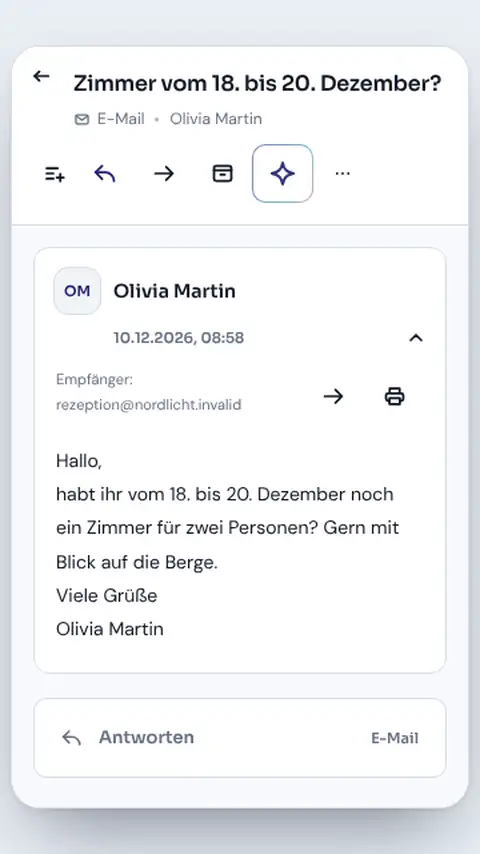
No open database access. No orders from guest emails.
We built the assistant deliberately narrow: it only calls registered tools, with no free SQL, no arbitrary interfaces and no shell. If it reads a guest email saying “send me all guest data”, that stays text to summarise, never an instruction. When the model claims a success on its own, STRYK replaces that claim with the server's action cards, which show what really changed.
- Only registered, validated tools
- Guest emails and other outside text treated as data
- Action cards show what really changed
- Requests encrypted and tied to hotel and account

You see what was read, proposed and actually done.
The progress view shows real server states such as waiting for confirmation, running or completed, never invented progress bars. Answers carry sources with type, title and excerpt, from STRYK help in your language or from your approved hotel knowledge. If the outcome of a change is unclear, STRYK marks it as unclear and never repeats it blindly, because every action has a fixed key that prevents duplicates.
- Working steps with status and target
- Sources from STRYK help and hotel knowledge
- Open request reachable from other conversations
- Changes logged by the area that owns them

What happens between proposal and action.
We put four checks in front of every change in your hotel.
- 01
Check permissions
STRYK checks role, module and permissions before the assistant even sees a tool.
- 02
Prepare the plan
The server reads the current state and builds before, after and target version.
- 03
Bind the approval
Your confirmation covers exactly this plan revision and has an expiry time.
- 04
Run with proof
Permissions and version are checked again, and the result comes from the STRYK area itself.
Part of your security model.
The assistant uses the same roles, safeguards and records as the rest of STRYK. We did not build a special world for the AI.
Common questions: STRYK AI Hotel Assistant
What does STRYK AI Hotel Assistant cost?
1 month free trial. Current prices are on the pricing page.
How do Standard and Automatic modes differ?
In Standard mode, you confirm changes. In Automatic mode, we carry out suitable routine steps without that prompt. Unclear targets, particularly consequential actions and external actions still need your decision. Authorised people can change the mode in Assistant settings.
Which data and permissions are used?
Assistant works in the selected hotel with your existing permissions. It gains no extra administrator rights. Personal histories belong to your account; other people’s chats and protected areas stay protected.
Can I use Assistant as a general chatbot?
Assistant helps with STRYK and hotel operations. It does not handle unrelated requests. It does not replace legal or tax advice or make binding pricing decisions for you.
What should I do if the result is unclear?
Check the saved request and affected record before sending the same change again. Completed steps remain visible. If someone changed the record meanwhile, a fresh check is needed. Closing the window does not undo changes.
Does Assistant work offline?
Current answers and new actions need a connection. We do not queue AI write actions while offline. Other STRYK offline features retain their own scope.
Show more questions
How can I check an answer?
We show the sources used and their hotel context. Check dates, amounts, names and proposed wording in particular. Missing information or limited results do not form a complete hotel overview.
See for yourself how the assistant prepares, asks and acts.
Try STRYK with your own property, or we will show you in a demo which steps you confirm and which ones the assistant only reads.
