

Your payment partner: all payments from one source.
STRYK Payments takes deposits in the booking engine, sends payment links for open balances and can turn a smartphone at the front desk into a card terminal. Our principle: STRYK only posts a payment to the booking and invoice once the payment provider confirms it. Front desk and accounting see the same status, right up to the payout in your bank account.

Deposit per rate
Software and payments come from STRYK, with one settlement instead of several providers and contracts.
Every payment method
Online, terminal, Tap to Pay in the STRYK App, payment link, vouchers and virtual cards of the portals.
Tap on a smartphone
Together with our payment partner, you accept cards directly in the STRYK App.
Reconciled automatically
Every payment lands on the booking, invoice, cash register and accounting, visible to everyone.
Guests who book direct pay the way you decide.
For each direct rate you choose: pay at the hotel, full prepayment or a deposit as a percentage or a fixed amount. You collect the rest at the hotel, or have it charged automatically to the stored card once the cancellation period has passed. Before paying, the guest sees exactly the amount your rule asks for.
- Pay at the hotel, prepayment or deposit
- Deposit as a percentage or fixed amount
- Voucher sales with online payment
- Balance payment after the cancellation deadline and refunds with their own status

One payment link instead of three reminder emails.
For an invoice or an open balance you create a payment link and send it to the guest or the company. STRYK only marks the amount as paid once the payment provider confirms it; an abandoned attempt stays open. The open items list shows due date, age of the receivable and the next step.
- Payment link for an invoice or balance
- Status changes only after provider confirmation
- Part payments reduce the open balance
- Send reminders straight from the list

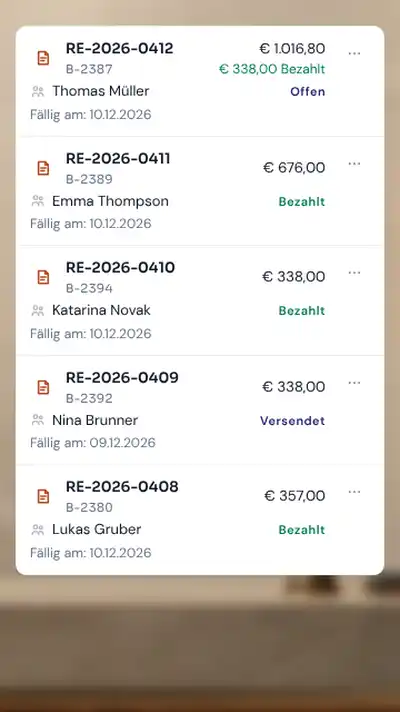
Room 204 pays by card. The invoice is settled on the spot.
You accept cards at the terminal or on your smartphone, and the amount appears on the bill immediately. With “Charge at terminal” you send the open amount or a partial amount to a card terminal when recording a payment or when the guest checks out. You don't need your own terminal: together with our payment partner, you accept cards via Tap to Pay directly in the STRYK App on your smartphone. STRYK posts the confirmed payment to the bill, and “Refund to card” sends a refund back to the same card. If the guest leaves a tip, STRYK books it separately as a liability to the team.
- Card terminal or Tap on a smartphone
- Part amounts straight on the invoice
- Tips kept separate from revenue and VAT
- For hotels in Austria, Germany and the Netherlands
No more charging portal credit cards by hand.
If a guest pays in advance through a portal, your hotel often receives a virtual credit card. STRYK Payments charges it for you: the card is linked to the booking, STRYK charges the amount due and posts the result to the invoice. Nobody types in card details or reconciles portal payments by hand. On the booking you can see which charge belongs to which booking and whether it went through. The card itself remains reserved for authorized staff members.
- Recognize the virtual card on the booking
- No revenue, no VAT
- Result of the charge on the invoice
- Failed charges stay visibly open
Every payout explained, down to the last fee.
Because all payments run through STRYK, you no longer need several payment providers, contracts and settlements. STRYK matches the payouts with payments, fees and refunds. When the money arrives in your bank account, the bank reconciliation assigns the payout. Front desk, accounting and tax advisor see the same status. Unclear cases stay in review, so that every completed reconciliation is a real one.
- One STRYK settlement for all payment methods
- Fees and refunds visible for each payment
- Matching in bank reconciliation
- Export as CSV and Excel
Payment options for your guests.
Cards, wallets and online bank payments. Guests use the methods enabled in your payment profile.


Availability depends on country, payment profile and device.
Every payment method your hotel needs, one partner.
These are the building blocks of STRYK Payments. All of them run through the same partner and post to the same booking and invoice.
Online payment
Direct bookings with prepayment or deposit, balance paid after the cancellation deadline has passed.
Card terminal
Collect open amounts or partial amounts at the terminal, and the invoice is settled immediately.
Tap to Pay in the STRYK App
Accept cards directly on your smartphone, together with our payment partner and without your own terminal.
Virtual credit cards
STRYK Payments charges the virtual card of a portal and posts the result to the invoice.
Payment link
Collect open invoices and remaining amounts by link. Once paid means the payment has been confirmed.
Vouchers
The voucher shop on your website takes payments online, and the sale lands in the same settlement.
Pre-authorization and deposit
An amount is reserved on the card, and at check-out it is either charged with the final amount or released.
Cash shifts with shift report
Each person at the front desk works in their own cash shift. Closing creates the shift report.
Split by percentage or amount
If a company shares the costs with the guest, you split items by percentage or amount across several invoices.
What ends with STRYK Payments.
STRYK takes these steps off your hands. Your team has more time for guests.
How STRYK charges portal credit cards- No more charging portal credit cards by hand.
- No more typing in payments and matching them with booking and invoice by hand.
- No more managing several payment providers, contracts and settlements.
- No more needing a terminal just to accept a card.
- No more writing reminder emails and searching for incoming payments.
- No more comparing payouts line by line with the bank statement.
From direct booking to bank statement.
One payment, four stages, one shared status for front desk and accounting.
- 01
Guest books direct
Online, at the terminal, in the STRYK App, by payment link or from a virtual card.
- 02
STRYK Payments confirms
Once confirmed, the payment counts as booked, and an aborted attempt stays open.
- 03
Provider confirms
Only then is the payment posted and the balance reduced.
- 04
Payout matched
Fees and refunds are assigned, and bank reconciliation finds the money.
Who works with it.
Front desk
Takes payments on the terminal or by link and sees what is still open before check-out.
Accounting
Matches payouts, fees and refunds and resolves review cases.
Management
Sets which rate requires a deposit, and works with one partner for all payments.
Part of your complete system.
We tied payments to booking, invoice and accounting. Nobody carries an amount across by hand.
Invoices
Payments post straight to the invoice and reduce the open balance.
Cash register & fiscalisation
In Austria and Germany the module signs payments taken on site.
Booking engine
Deposits and prepayments right at the direct booking.
Finance
Bank reconciliation, daily close and handover to your tax adviser.
Common questions: Payments & balances
What does STRYK connect for payments?
Booking, payment intent, method, amount, provider state, fees, refund, invoice and remaining balance.
Which manual payment methods can I record?
Cash, bank transfer, credit card, PayPal, OTA payment, company account and other, each with date, reference and note. In Austria and Germany, cash and card payments on site need the ‘Cash register & fiscalisation’ add-on.
Can front desk see partial payments?
Yes. Paid amount, remaining balance and state are updated from recorded payments and shown on the stay.
Can an incorrect payment be corrected?
Yes. With permission a payment can be removed; invoice and booking payment state are then recalculated from the remaining amounts.
Which online payment methods does STRYK support?
Online payments run exclusively via the integrated payment service. Which methods your guests see, for example credit card, PayPal, Apple Pay or EPS, depends on the methods enabled in your hotel’s payment account. Bank transfer is not available in the online checkout.
What does a property need for online payments?
Your hotel needs its own payment account connected to STRYK. Online payments run exclusively via the integrated payment service; bank transfer is not offered in the online checkout. Bank transfers received can still be recorded manually on the invoice.
Show more questions
Is provider setup automatically live?
No. Onboarding, test mode, credentials, approved methods and connection test must be complete. Test credentials may not appear as live payment.
Can STRYK calculate deposits?
Yes. The rate plan defines whether the guest pays at the property, in full in advance, or with a deposit and remaining balance. STRYK automatically calculates the amount due.
Can the balance be charged automatically?
Yes, for direct bookings paid online: STRYK automatically collects the balance via the integrated payment service at the cancellation deadline, or immediately if there is no free cancellation period. If a collection fails, STRYK tries again on the following days and then flags the case for manual follow-up. For an issued, open invoice, STRYK also creates a payment link that you copy or send by email; the guest pays the open amount via the integrated payment service.
How are due balance payments monitored?
Scheduled payments have states such as scheduled, blocked, failed or manual required. The payment area shows open actions centrally.
Can a payment be authorised and captured later?
Yes, where provider and method enable the capability. STRYK keeps authorisation and capture as separate traceable states.
Are partial refunds possible?
Yes. STRYK supports partial and full refunds and checks that no more than the captured amount is returned.
What happens on a provider error?
The operation receives a visible failure state and safe message. STRYK does not record success unless the provider confirmed it.
Does STRYK prevent duplicate charges?
Payment actions, webhooks and manual payout matches use idempotency keys or unique events so retries are not silently booked twice.
How secure are provider webhooks?
Provider events are validated, assigned to the property and protected against replay. Invalid or unassignable notifications are rejected.
Does STRYK show provider fees?
Yes. Estimated provider fee, net amount and actually reported fees are kept separately in payment and ledger context.
Can I reconcile OTA payouts?
Yes. Payouts, commissions, fees, refunds and unmatched lines are shown separately and can be deliberately matched to a booking or ledger line.
Is channel payout reconciliation automatically complete?
Clear payments, commissions, fees and refunds are matched automatically. Conflicting or incomplete lines remain visibly under manual review until finance resolves them.
Which overview does management get?
Transactions, captured amounts, refunds, fees, scheduled balances, payout state and unmatched items in one dashboard.
Can I export payment data?
Yes. CSV and spreadsheet-compatible exports include transactions, operations, schedules, ledger, payouts and matches. Generated exports remain available in history.
Who may manage payments?
Payment and finance actions are role-based. Sensitive provider settings and corrections remain limited to responsible employees.
Are payments isolated between properties?
Yes. Payment activity, payment providers, bookings and payouts remain clearly assigned to the relevant property.
Does Payments cost extra?
The payment features are included in the STRYK price, with no set-up fee. The usual fees per card payment for processing, the bank and the card scheme are charged by your payment provider under its terms. Without online payment, there is no platform fee.
See how a deposit travels all the way to the payout.
Try STRYK for 14 days with your own property, or we will show you the payment flow in a demo.
