

One invoice at check-out, formally correct the first time.
STRYK builds the invoice from the stay: room, breakfast, minibar, restaurant charges and tourist tax are already on it. Before a number is assigned, STRYK checks the mandatory details and shows with “Fix” where something is missing. We built sending so that front desk and accounting send exactly the PDF they have checked.
Straight from the stay
Services, part payments and the remaining balance come from the booking.
Mandatory details checked
If something is missing, STRYK blocks issuing and takes you to the fix.
E-invoicing included
Send ZUGFeRD and XRechnung, receive XRechnung, ZUGFeRD and UBL.
In 18 languages
The invoice goes out in the guest’s language, with dates and amounts to match.
Room, dinner and tourist tax on one invoice.
At check-out STRYK takes the services of the stay into the draft invoice, including minibar and restaurant charges from the till. The deposit from the booking day is shown as a payment, so only the balance remains open. For business travellers you choose a company recipient with VAT number and billing address.
- Invoice from the booking or from scratch
- Private and company recipients
- Tourist tax as its own line
- Part payment and remaining balance
STRYK checks before the invoice number is assigned.
STRYK checks every invoice for mandatory details before it is issued, in Austria under the VAT Act and the Commercial Code: small-amount invoices, VAT numbers of issuer and recipient, company register details. If something is missing, the checklist shows “Fix” and takes you straight to the right setting. STRYK only assigns the number from your sequence when the invoice is issued.
- Checklist with “Fix”
- Number sequences for invoices and credit notes
- Service period taken from the stay
- Choice of invoice template and document design
What you see in the preview is what the guest receives.
Preview, download, print and email all use the same PDF. When you send it, STRYK archives the original together with the email, and the sending status stays visible on the invoice. Companies and public authorities receive an e-invoice as ZUGFeRD to EN 16931 or as XRechnung with a Leitweg-ID.
- PDF in 18 languages
- Original PDF and sending log
- ZUGFeRD and XRechnung with Leitweg-ID
- E-invoices received as XRechnung, ZUGFeRD and UBL
Mistakes are fixed with a credit note, not an eraser.
We leave an issued invoice exactly as it was issued. You correct it with a numbered credit note that STRYK links to the original, and both remain in the history. With the optional billing plans you bill long-stay and corporate guests periodically, with splitting, moving and supplementary charges.
- Numbered credit note linked to the original
- Cancellation with history
- Billing plans for companies and long stays
- Export with line items and payments
Split, collect or leave open. However the guest pays.
Not every stay ends with exactly one invoice. STRYK splits items by percentage or amount, collects the costs of a group on one master invoice and allows check-out via an open folio. Each invoice keeps its mandatory details.
Split by percentage or amount
Part of the room goes to the company, the rest and the extras to the guest: you split individual items or the entire invoice.
Check-out with open folio
The guest departs, and settlement comes later. The folio stays open until the company or travel agency has paid.
Group master invoice
Rooms and event services of a group go onto one master invoice, and the participants’ extras onto their own invoices.
Commissions for travel agencies
STRYK calculates the commission from a travel agency’s bookings and records when it was paid out.
From draft to paid invoice.
Four steps and one status that front desk and accounting share.
- 01
Draft from the booking
Services, recipient and payments are already in.
- 02
Check
The checklist shows missing mandatory details with “Fix”.
- 03
Issue and send
Number assigned, PDF archived, email sent with the original.
- 04
Payment
Terminal, payment link or bank reconciliation settle the balance.
Who works with it.
Front desk
Bills at check-out and sends the invoice in the guest’s language.
Accounting
Checks company invoices, corrects through credit notes and exports the month.
Management
Sees overdue invoices and open amounts without having to ask.
Part of your complete system.
STRYK builds the invoice from booking, till and quote and carries it straight on into payment and accounting.
Common questions: Invoices
How is an invoice created in STRYK?
Directly from the booking or manually. Booking services, guest or company and recorded payments form the verifiable basis.
Can I issue private and company invoices?
Yes. Recipient type, company name, address, VAT ID and other recipient data are kept separately and can be filtered.
Which lines can an invoice contain?
Rooms, extras, minibar, transferred POS charges, tourist tax, discounts and custom services-with quantity, unit price, tax rate and order.
Are net, tax and gross calculated?
Yes. STRYK calculates amounts from quantity, gross unit price, discount and tax rate and shows the tax summary in the document.
When does an invoice get its number?
On finalisation. The property-bound number sequence assigns the next number; the draft remains editable beforehand.
Can a finalised invoice still be edited?
Not freely. Only an unpaid, unsent finalisation can be deliberately returned to draft. Otherwise correction uses cancellation or a credit note.
Show more questions
How do I cancel a paid invoice?
STRYK creates a finalised credit note and links it to the original. The original remains traceable as cancelled or credited.
Can I record partial payments?
Yes. Each payment has amount, date, method, reference and note. The invoice moves to partially paid or paid accordingly.
How do I identify open and overdue invoices?
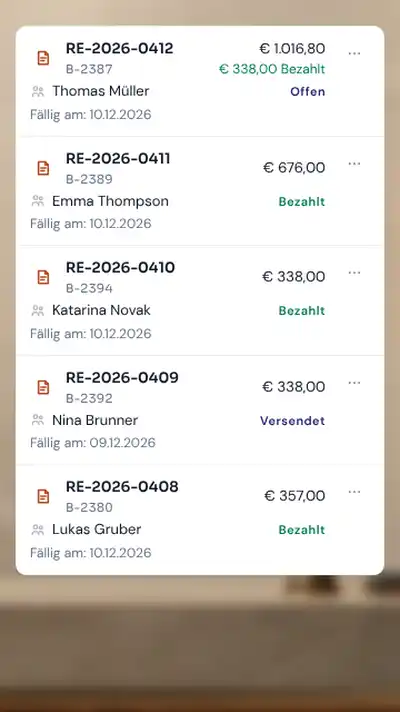
Dashboard, list and filters show open, partially paid, sent and overdue documents with amounts. A daily process updates due open documents.
Can I send invoices by email?
Yes. Recipient, CC, subject and message are checked; the PDF is attached. Success and failure are documented in the send log.
Does the preview match the final PDF?
Yes. Preview, download and email use the same professional STRYK A4 document. What the team approves is what the guest receives.
Which languages does the PDF support?
Any of the 18 STRYK languages can be selected for each document, including German, English, Hungarian, Italian and Croatian. Without a separate choice, STRYK uses the document or property language.
Can the document carry my property design?
Yes. Logo, colours, sender details, bank account, pre- and post-texts and other finance settings flow into the shared template.
Does STRYK support ZUGFeRD?
Yes. When you send an invoice to a company, STRYK creates the e-invoice in ZUGFeRD format, and as XRechnung for German public-sector clients with a Leitweg-ID. Where e-invoicing is mandatory, as in Germany from 2027, STRYK chooses it automatically; otherwise only if the company has agreed. Private guests receive the PDF.
Does ZUGFeRD replace local legal review?
No. Format support does not replace review of mandatory data, retention, fiscalisation and country-specific invoice rules.
Can I restore earlier draft versions?
Yes. Invoice changes create versions; a suitable earlier state can be restored deliberately.
Are POS charges transferred?
Before finalisation, open POS charges clearly belonging to the booking can be transferred to the draft. Errors visibly block finalisation.
Can I search and sort invoices?
Yes. Search, period, status and private or company recipients can be combined across the complete invoice list. Sorting and pagination keep the same selection.
Which accounting exports are available?
CSV and spreadsheet-compatible workbooks include invoices, lines, payments and send log; period, state and document type match the selection.
Are property invoices and STRYK contract invoices separate?
Yes. STRYK manages property guest invoices and payments. Commercial contract, subscription and STRYK billing run separately.
Who may finalise or cancel invoices?
Finance permissions limit reading, editing, finalisation, payment and correction. Every material action remains traceable in the activity log.
What happens on a PDF or mail error?
The action fails visibly with a safe error. STRYK does not mark the document sent when rendering or SMTP failed.
Does invoicing cost extra?
No. Invoices, payments, PDF, email, credit notes, versions and exports are part of the single STRYK offer-with no setup fee and no hidden finance module price. External mail, payment or accounting partners may charge their own fees.
Issue your first invoice with your own hotel details.
Try STRYK for 14 days with your own property, or we will show you the path from checkout to paid invoice in a demo.
