

At 2 pm you just hand over the key. The paperwork is done.
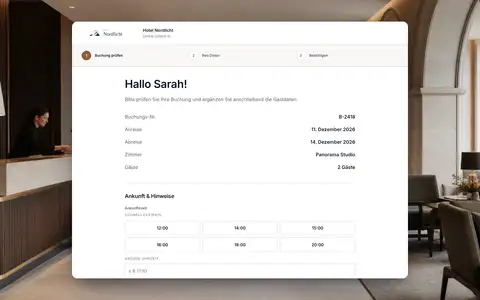
Your guests fill in registration details, ID and signature on their own phone before they arrive, through a personal link to their booking. We built online check-in so that front desk sees on the booking who is finished and what is still missing. Afterwards the guest portal shows directions, Wi-Fi and, if you want, the key box code.
Personal link
Each link belongs to exactly one booking, with no guest account and no app.
ID with a quality check
ID upload with image check and a signature on the phone.
Fields you choose
You decide which details are shown and which are required.
Access at the right time
The guest portal reveals key box code and Wi-Fi only from your lead time.
A link to the booking, not one form for everybody.
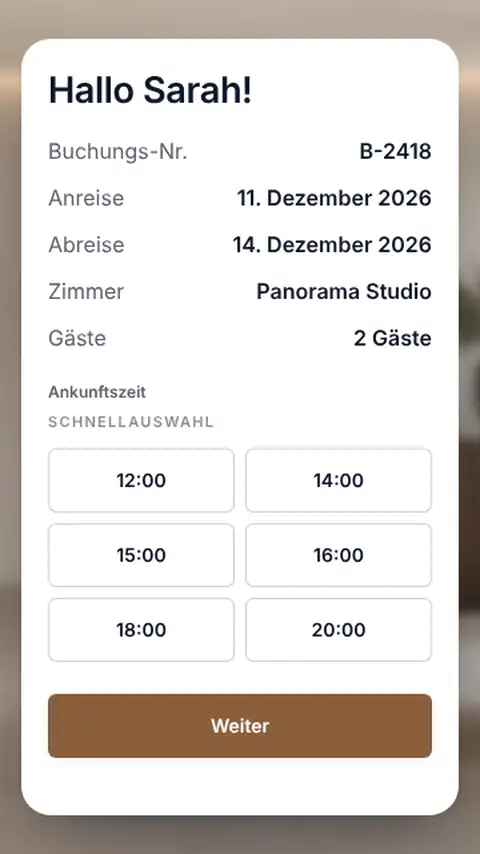
STRYK sends the check-in link from the booking, with a template or automatically before arrival. The guest first checks dates, room and number of people, then adds their details. STRYK records on the booking when the invitation went out.
- One link per booking, no guest account
- Sent by template or automation
- Proof of invitation on the booking
- In every active guest language
Main guest and companions, each with their own record.
The guest enters themselves and everyone travelling with them separately, with nationality, contact details and travel document. They upload a photo of their ID and STRYK checks the image quality. Under the country profiles for Austria and Germany, the travel document of the main guest is enough, and you can set a stricter rule yourself.
- Companions captured individually
- ID upload with quality check
- Fields optional or required per hotel
- Digital signature
You know whether the guest arrives at 3 pm or 8 pm.
During check-in the guest picks an arrival time from quick options or types their own, and leaves a note. That lets you plan late arrivals and the evening shift before the first guest is standing at the desk.
- Arrival time from quick options
- Custom time and notes
- Complete and missing details on the booking
After check-in, everything the guest needs is behind one link.
In the guest portal the guest sees their bookings, writes to the hotel, sends change or cancellation requests and finds their vouchers. For apartments and rooms with a key box you store directions, house rules, Wi-Fi and the code. We store code and Wi-Fi password encrypted and only show them from your lead time, and only after online check-in if you prefer.
- One-time link, optional guest password
- Requests land in STRYK Inbox
- Key box code and Wi-Fi released on schedule
- Every reveal by staff is logged

From booking to key.
The idea behind it: the guest handles the formalities, front desk stays in control.
- 01
Invitation
The link goes out with the confirmation or a few days before arrival.
- 02
Guest completes
Details, companions, ID and signature on their phone.
- 03
Front desk reviews
STRYK shows on the booking what is complete and what is missing.
- 04
Arrival
Front desk checks in with the registration data already there, the portal shows access.
Who works with it.
Guest
Fills everything in calmly on their own device, without an account or an app.
Front desk
Sees before the arrival rush who is done and only follows up where needed.
Apartment hosts
Release key box code and Wi-Fi on a schedule instead of sending codes by messenger.
Part of your complete system.
What the guest enters online carries on into registration, kiosk and guest profile. Nobody types it in again at the desk.
Common questions: Online check-in
What is STRYK online check-in?
Guests complete the details required for arrival in advance through a protected personal process. Information remains connected to the correct booking and can be reviewed by front desk before check-in.
How does online check-in help a small hotel?
Front desk does not collect every required detail only when several guests arrive at once. Missing data becomes visible earlier while personal hospitality remains wherever the property wants it.
How does the guest receive the check-in link?
The link belongs to one specific booking and is sent through the appropriate communication path. It is not a general form where guests freely select a property or stay.
Is the link publicly discoverable?
No. The process uses a personal protected reference to the booking. Public marketing or booking pages do not expose other stays and do not allow guest data to be retrieved by simple guessing.
Which details can the hotel request?
The property defines guest and accompanying traveller details required for arrival, stay and legal registration. It should enable only fields genuinely needed and legally justified in its operation.
Can several accompanying travellers be captured?
Yes. Travellers are assigned structurally to the correct stay. Adults and children do not become unclear free text on the main guest, and required registration details can be prepared per person.
Show more questions
Can document details be prepared?
Required identity and registration details can be prepared in the protected process. Front desk checks plausibility and completeness on the stay before using them for completed check-in or reporting.
Does completing the form automatically check the guest in?
Not necessarily. Submitted online details and operational check-in state are deliberately separate. The property can review information first and complete check-in only after room readiness, identity or payment checks.
Where does front desk see the status?
Progress remains visible directly on the related booking and in the online check-in workspace. Employees do not need to search email replies or external forms to assess completeness.
What happens when required details are missing?
The process remains incomplete and shows which details are missing. STRYK must not present an incomplete record as a finished check-in, allowing front desk to follow up precisely.
Can the guest correct details later?
While the personal process remains valid and not operationally closed, permitted details can be completed or corrected. Changes to already verified or legally relevant data remain a deliberate front-desk process.
How long does a link remain valid?
Validity follows the related booking and secure check-in window. Expired, withdrawn or no longer relevant processes must not continue to provide access to stay data.
What role does privacy play?
The property requests only necessary data, protects the personal process and limits internal access by role. Lawful basis, notice, retention and deletion must fit the operation before production use.
Is online check-in multilingual?
The guest journey follows STRYK and booking engine multilingual foundations. Active guest languages, external copy and required information are maintained for the property rather than inferred from employee language.
Does online check-in work on a smartphone?
Yes. The public flow is mobile-first so guests can complete it on their own device without installing an app. Fields, progress and confirmation remain fully usable on small screens.
Does the guest need a STRYK account?
No. The guest uses the protected process associated with the booking and does not create an employee or hotel account. Internal STRYK accounts remain exclusively for authorised hotel staff.
Can online check-in support guest registration?
Yes. Structured traveller and registration details can flow into the responsible STRYK guest registration process. The property still reviews them before registration forms, exports or Feratel transmission.
How does online check-in relate to the kiosk?
Both paths use the same booking and guest context but serve different situations. Online check-in happens in advance on the guest’s device, while the kiosk is the property-specific self-service interface at arrival.
How do room release and key handover remain safe?
Complete guest details do not release a room automatically. Front desk and housekeeping confirm that it is ready. STRYK connects common door lock systems; key cards and mobile keys come from the booking. For key handover without reception, hotels use the room number display or a manually stored key safe code.
Which mistakes should a property avoid?
Common mistakes include general links, too many required fields, missing privacy notices and assuming a completed form automatically means operational check-in. Every step needs a visible success signal.
How is online check-in introduced?
The property defines fields, languages, privacy notice, delivery timing and ownership. It then runs a complete test booking with main guest, companion, missing field, correction and visible front-desk review.
What does online check-in cost?
Online check-in is part of the single STRYK offer, with no setup fee or hidden STRYK module tier. Online payments follow the payment terms shown on the pricing page.
What can you try with online check-in in your demo access?
In your demo access you open the personal link on a phone, add the main guest and fellow traveller details, resolve a missing required field and complete the process. The new status appears on the booking immediately.
Send your next guest the check-in link.
Try STRYK for 14 days with your own property, or we will show you the flow from link to key box code in a demo.
