

Arrival at 11 pm, desk closed, and the guest still checks in.
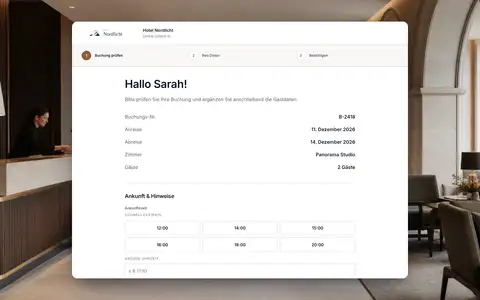
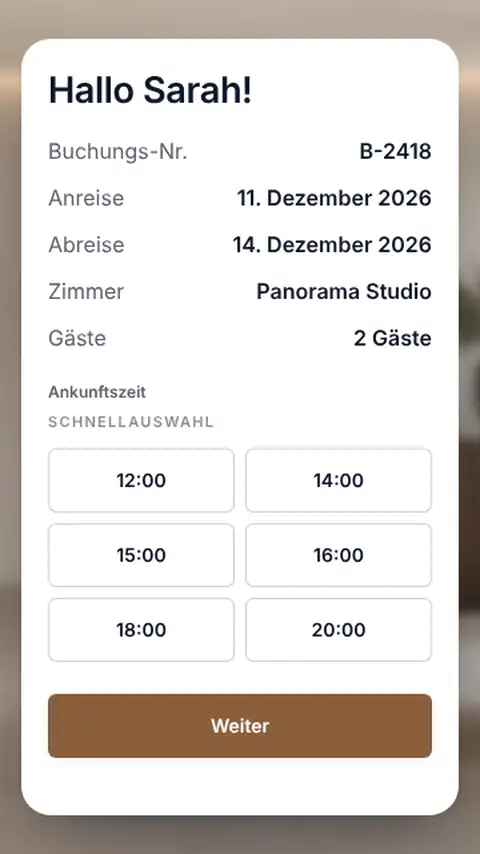
The kiosk is a paired device in your lobby where guests find their booking, add their details and ID, and sign. We built it deliberately narrow: it runs without a staff login and can only do self check-in. Afterwards it shows the room number, the key safe code or your own message, depending on your settings.
Paired by code
An eight-character one-time code connects the device to your hotel.
Built for self-check-in
No staff login, no guest lists, no settings.
Just like online
Companions, ID and signature, as in online check-in.
Back to the start
After a set idle time the kiosk resets itself.
Booking number, surname or email is all it takes.
On the start screen the guest looks up their booking by booking number, surname or email. To protect your guests, the kiosk only shows a booking that matches clearly and never a list of other people's names. If something is unclear, it sends the guest to the hotel team.
- Search by booking number, surname or email
- No public result lists
- Welcome texts from your hotel
- In every active guest language
Details, ID and signature right at the device.
The guest confirms the booking, adds themselves and their companions and captures their ID with a photo, which STRYK checks. If your hotel asks for a signature, they sign on the screen. STRYK saves the result on the stay straight away.
- Companions individually
- ID check with quality control
- Signature on the screen
- Status on the booking at once
Room number, key safe code or a message of your own.
You decide what the guest sees after check-in: the room number, the code for the key safe or your own note, about breakfast from 7 am for example. After an idle time you set, the kiosk returns to the start screen so the next guest sees nothing of the previous one.
- Finish with the room number
- Code for the key safe
- Custom closing message
- Reset after 30 seconds to 10 minutes
A screen in the lobby becomes a kiosk, and you stay in control.
In STRYK you create an eight-character pairing code that is valid for 15 minutes and enter it on the device. From then on the device works only for your hotel. If you no longer need it, or it goes missing, you unpair it in STRYK.
- Pairing code valid for 15 minutes
- Manage several devices
- Unpair at any time
- Retention period for ID images
From start screen to room.
We show you a late arrival with nobody at the desk.
- 01
Find the booking
Enter booking number, surname or email.
- 02
Add details
Capture guests, companions and ID.
- 03
Sign
On the screen, if your hotel requires it.
- 04
To the room
Room number or key safe code, then back to the start.
Who works with it.
Guest
Checks in on their own, even when nobody is at the desk at 11 pm.
Front desk
Sees every kiosk check-in on the stay the next morning and handles the exceptions.
Management
Pairs devices, sets the closing screen and idle time and unpairs when needed.
Part of your complete system.
The kiosk writes to the same booking that front desk and registration use.
Common questions: Check-in kiosk
What is the STRYK check-in kiosk?
The kiosk is the property-specific self-service interface for on-site arrivals. Guests identify their booking, complete required details and follow the permitted check-in flow without accessing the internal PMS.
Which hotels benefit from a kiosk?
It suits small teams, apartments, late arrivals and peak periods where standard details can be captured independently. Personal service remains possible and is not replaced by a mandatory full-automation concept.
How is a property kiosk opened?
Each property receives its own kiosk access through its STRYK domain. The kiosk opens directly in guest self-service, without going through internal hotel administration.
Can a kiosk access other hotel data?
No. Access, booking search and check-in remain limited to the relevant property. Internal lists, finance, settings and data from other properties are not accessible to guests.
How does the kiosk identify a booking?
Guests use booking and identity details approved by the property. STRYK checks whether they belong to an active matching stay before personal details or the next step become visible.
What happens with several similar bookings?
An ambiguous search does not advance an arbitrary guest. The kiosk requests additional permitted identification or directs the guest to front desk instead of showing public lists of personal matches.
Show more questions
Which details does the guest enter at the kiosk?
The kiosk uses guest, accompanying traveller and registration details approved for the property, booking and arrival. Configuration should contain only operationally necessary and legally justified fields.
Can the kiosk handle multiple travellers?
Yes. Accompanying travellers are added structurally to the stay so required details can be reviewed per person. The kiosk does not place every traveller into one uncontrolled text field.
Does the kiosk check room readiness?
The check-in flow must consider the current stay and approved room state. A room that is not ready or operationally blocked must not be treated as ready merely because guest details were entered.
Is check-in status written back to STRYK?
Yes. A successfully completed kiosk step becomes visible on the correct stay. Front desk and management then use the same status instead of reconciling a separate kiosk list.
What does front desk see when an error occurs?
Missing identification, mismatched booking, incomplete required details or blocked check-in remain visible as concrete states. The kiosk shows no false success and offers a clear path to personal assistance.
Can the kiosk work without front desk?
It can handle defined standard arrivals independently. Exceptions such as unclear identity, wrong booking, unready room, open payment or special assistance still need a defined escalation path to the hotel team.
Is the kiosk multilingual?
The guest journey follows STRYK and booking engine multilingual foundations. The property activates appropriate guest languages and maintains external copy separately from employee language.
Which hardware does the kiosk require?
The kiosk runs in the browser, for example on a tablet or touchscreen with a stable internet connection. Payment terminals or other additional devices are not needed; STRYK connects common door lock systems, and what matters for the kiosk is an easily accessible location and a suitable screen size.
How does payment fit into the kiosk journey?
There is no payment and no payment terminal at the kiosk. Guests settle outstanding amounts online in advance via the integrated payment service, for example as a deposit or through automatic balance collection, or they are dealt with at reception.
How is key handover connected to the kiosk?
After check-in, depending on the settings, the kiosk shows the room number, a key safe code you have stored or your own message. Key cards and mobile keys are created from the booking via the common door lock systems STRYK connects.
Which lock systems does STRYK support?
STRYK connects common door lock systems: the front desk creates room cards from the booking, and guests can receive a mobile key on their smartphone. For key handover without reception, hotels use the room number display or a manually stored key safe code.
How is a kiosk protected against misuse?
Access is property-bound, public sign-in attempts are rate-limited and the kiosk receives no general PMS role. Personal result lists, internal navigation and sensitive administration remain outside the self-service interface.
What happens when the kiosk loses network access?
Check-in write actions require a confirmed connection to current hotel state. During an outage, the kiosk shows a clear error and help path instead of pretending an unsaved check-in succeeded.
How should a hotel introduce the kiosk?
Before launch, the property verifies location, device, domain, kiosk access, languages, identification, fields and escalation. Tests cover correct booking, wrong input, ambiguity, missing field, unready room and network outage.
What does the STRYK kiosk cost?
The kiosk is a separate module included in the core price, with no set-up fee and no surcharge. The only cost is for the device on which the kiosk runs in the browser.
Can the property test the kiosk first?
Yes. A test arrival covers booking search, identification, missing details, room readiness, completion and personal assistance. The property goes live only when the standard journey and exceptions work clearly for guests and staff.
What can you try with the kiosk in your demo access?
In your demo access you identify an arrival, add missing details, review room readiness and status, and see how the guest can move directly to personal assistance when needed.
Put your kiosk in the lobby.
Try STRYK for 14 days with your own property, or we will show you pairing and self check-in in a demo.
