

Guest registration gets done at check-in, not late at night.
STRYK captures registration data for every traveller during online check-in, at the kiosk or at the desk, and checks it before you report it. In Austria you submit to Feratel or create MBS and CSV files, and properties in Hungary report to NTAK. Front desk sees for each stay what is complete, reported or rejected.

Feratel in Austria
Registration form, guest card and travel groups sent straight from STRYK.
NTAK in Hungary
NTAK data reporting is built from the same stay data.
Every guest counts
Completeness per traveller, not just for the lead booking.
Fix errors precisely
Correct rejected records and resend only those.
The data is created where the guest types it.
Online before arrival, at the kiosk or at the desk: STRYK stores registration data per person on the stay. At the desk, STRYK reads IDs with an MRZ reader and checks document quality. Required fields follow the country profile and your own hotel rules, and missing required details visibly stop the check-in.
- Online check-in, kiosk or front desk
- MRZ reader and quality check for IDs
- Country profiles for Austria and Germany
- Check-in only with complete registration data
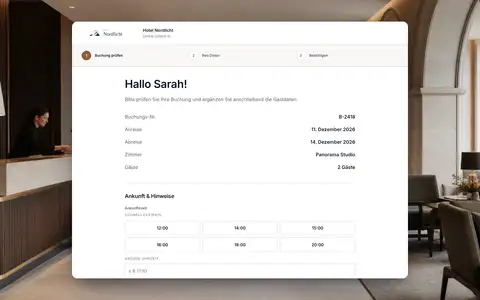
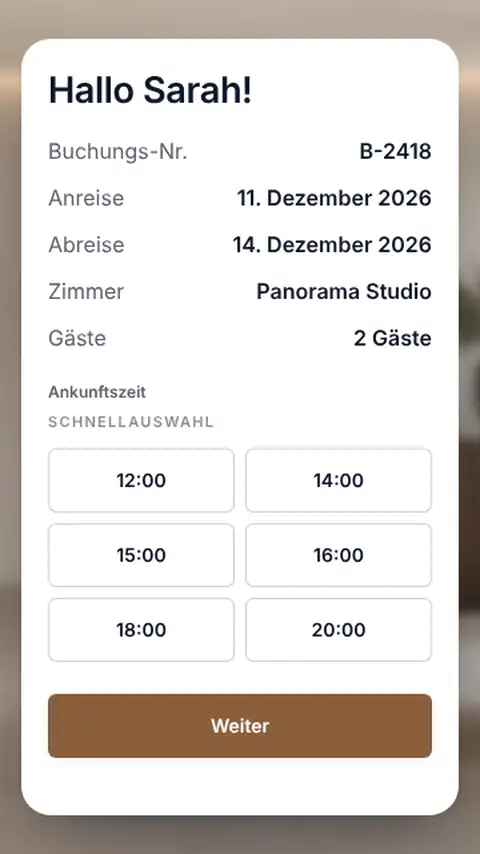
Feratel, guest card and mobility ticket in one flow.
With a tested Feratel connection, STRYK submits registration forms directly, with travel groups marked and every traveller listed individually. The guest card is only created with the guest's consent. You pull Feratel pre-check-ins into STRYK before arrival and correct confirmed pre-registrations on the stay. In the province of Salzburg, STRYK links the mobility ticket to the confirmed registration.
- Connection test before the first submission
- Guest card with consent
- Import of Feratel pre-check-ins
- MBS and CSV files where the municipality asks for them

For properties in Hungary, reports go to NTAK.
Properties in Hungary store their NTAK access details in STRYK. Check-in, stay and departure produce the required data reports, which STRYK transmits on a schedule. You can see the status of every transmission in the NTAK area of guest registration.
- Reports from check-in and departure
- Scheduled transmission
- Status visible for every report

Accepted, rejected, open: for every single guest.
The registration overview filters by period, completeness and status, and a total count also shows older open cases. If Feratel rejects a record, you correct it on the stay and resend just that one. STRYK only marks a generated file as done once you confirm it was submitted.
- Filters by period and status
- Open cases across all days
- Retries only for failed records
- Export history with format and period
From ID to confirmed registration.
We keep four steps traceable on every stay.
- 01
Capture
Registration data per person online, at the kiosk or at the desk.
- 02
Check
STRYK shows missing required details before check-in.
- 03
Report
Submission to Feratel or NTAK, or a file for the municipality.
- 04
Close
Accepted reports are done, and you retry errors one by one.
Who works with it.
Front desk
Completes missing details on the stay and sees straight away whether the report went through.
Management
Sets up Feratel or NTAK, tests the connection and decides which fields are required.
Hosts
Let guests enter their registration data online and report without a paper pad.
Part of your complete system.
Our principle: what the guest enters at check-in, STRYK also uses for registration.
Common questions: Guest registration
What does guest registration cover in STRYK?
STRYK connects registration data per traveller with booking, check-in, submission state and export history. The property sees the complete verifiable process rather than isolated fields.
When is registration data created?
They can be prepared during online check-in or completed at front desk check-in. They are stored only in connection with the correct stay.
Are fellow travellers captured individually?
Yes. Adults and children are maintained as structured registrations for the stay. This shows which person is complete and which still needs attention.
Which fields can the property require?
Check-in settings control standard and custom fields, required state and guidance. The property adapts the process to its actual registration and service requirements.
How is identity document data handled?
Document type, number, issuing country and expiry can be required depending on nationality and property rules. Missing required data visibly stops completion.
Does online check-in require consent?
Yes. The public flow accepts registration data only after explicit confirmation of the details and consent to processing for check-in, registration and stay.
Show more questions
Does online check-in physically check the guest in automatically?
No. It stores prepared guest data and marks the online step complete. Front desk reviews the stay and deliberately performs the actual check-in.
How does the team find open registrations?
The registration overview filters by date range, completeness and reported state. Open cases can therefore be resolved deliberately before the next export.
Is there a global open count?
Yes. A count independent of the current date filter shows how many registrations remain unresolved overall. Older cases do not disappear behind a narrow daily view.
Is registration state visible on the booking?
Yes. The booking receives a summary of existing, complete and reported registrations, including the most recently used format.
What is the CSV export for?
CSV provides a clear, processable dataset for review and agreed handoffs. The property decides according to local requirements whether and how the file is submitted.
What is the MBS format?
MBS is a standardised Austrian registration authority file format. STRYK generates it from selected registrations; the property verifies municipal requirements and configuration before use.
How does Feratel work in STRYK?
Feratel is technically connected to STRYK. Direct transmission to Feratel Deskline in live operation will only be enabled after acceptance; until then, STRYK provides registrations as an export, for example in MBS format. We clarify which registration route applies in your region before you start.
What does the Feratel connection require?
It requires property and access details supplied by the partner plus valid activation. STRYK encrypts sensitive credentials; the contract and possible partner fees remain with the external provider.
Can the connection be tested before first submission?
Yes. A dedicated connection test checks the entered Feratel configuration. Only a successful test provides a reliable basis for real submissions.
Does Feratel return results per guest?
Yes. STRYK processes accepted and rejected records individually. This shows which traveller was reported and who needs a specific correction.
Can a failed submission be retried?
Yes. Failed Feratel exports can be retried deliberately. Affected registrations can also be reset to open when data must be corrected first.
Is a generated file automatically treated as submitted?
No. CSV and MBS files remain reviewable after generation. Only deliberate confirmation following actual submission marks the included registrations complete.
Can registrations be prepared automatically?
Yes. File exports and Feratel submissions have separate schedules with interval and run time. File jobs still require real external submission and subsequent confirmation.
Is export history retained?
Yes. Format, period, record count, state, creation time and errors remain traceable. Generated files can be downloaded again without pretending a new submission occurred.
Who may work with guest registrations?
Viewing and managing are separate permissions. Registration data, exports and settings remain limited to responsible roles within the property.
Does STRYK replace the property’s legal review?
No. STRYK supports capture, validation, export and state tracking. Which data must be reported, when and to whom depends on the property location and applicable requirements.
Does guest registration cost extra as a STRYK module?
No. Registration list, exports, status and connection workflow are part of the single STRYK offer, with no setup fee and no hidden registration module price. Authorities, Feratel or other external partners may charge their own fees.
Register your guests from the same data you check them in with.
Try STRYK for 14 days with your own property, or we will show you Feratel, NTAK and the registration overview in a demo.
