

Your till posts to the room. At check-out the invoice is right.
STRYK POS connects the register of your restaurant, bar or spa with STRYK. Cloud registers post via the STRYK register interface, and registers with a FIAS interface post via the STRYK POS Bridge in the hotel network. Your existing register stays, and we make sure every restaurant item lands on the right stay instead of a slip of paper. STRYK Table fills in the tables for it: guests reserve online on your hotel website, the waiting list offers tables that become free, and the menu is available in every language.
STRYK POS is a separate add-on with a trial month. Current prices are on the pricing page.

Two ways in
Cloud tills through the interface, local tills through the FIAS-compatible Bridge.
Guest matching that asks
If the room number is ambiguous, STRYK asks instead of guessing.
No double posting
The till’s reference stops the same charge arriving twice.
All tills included
One module price per room for every connected till, with no setup fee.
The guest in room 112 orders wine. It is posted straight away.
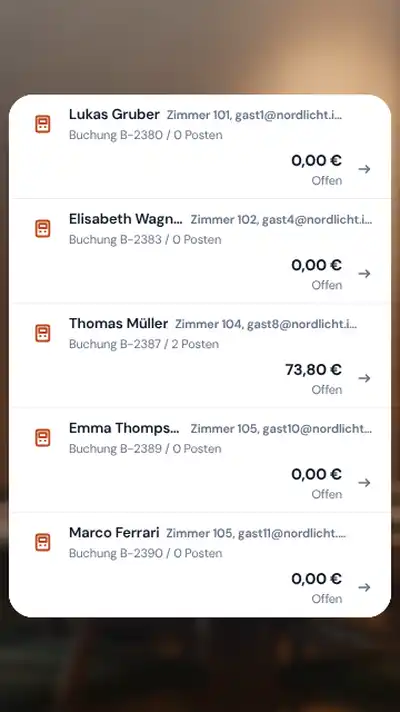
The till asks STRYK for the guest in room 112, the waitress confirms the name and the charge sits on the stay. STRYK only posts to checked-in rooms; if the guest has already left, STRYK declines and the till takes payment directly. The front desk sees the item at once and it appears on the invoice at check-out.
- Look up checked-in rooms
- Batch posting of up to 50 items
- Separate outlets such as bar, restaurant and spa
- Record items at the front desk too

You keep your till. Our team connects it.
If your till runs in the cloud, it connects to the STRYK POS interface with a key bound to your hotel; we hand the open technical reference to your POS provider. If your till speaks FIAS, the STRYK POS Bridge runs on a computer in your hotel network, as a Windows service, on Linux or in Docker. Our team handles the setup and the coordination with your till manufacturer.
- Cloud tills through the STRYK POS interface
- FIAS-compatible Bridge with vendor profiles
- Connect the Bridge with a pairing code
- Webhooks to the till

The router goes down. The Bridge knows what it may do.
If the STRYK POS Bridge cannot reach STRYK, it declines room charges by default and the till takes payment from the guest. If you prefer, it accepts charges within fixed limits, stores them encrypted and posts them later in the right order without duplicates. Anything STRYK cannot accept by then, for example because the guest has checked out, STRYK opens as a case to resolve.
- Decline offline by default
- Accept within amount and room limits
- Encrypted queue
- Catch-up posting without duplicates
By evening, the till and the hotel agree.
Under POS in Finance you see active accounts, till items and differences, plus revenue per outlet for the day, what is still open on rooms and what was voided. STRYK shows possible double postings there before a guest pays twice. A charge on the wrong room moves to the right stay with a reason and a history, and the hotel daily close includes POS revenue.
- Daily revenue per outlet
- Differences and possible double postings
- Void while the item is not yet billed
- Move charges with a full history
From receipt to room invoice.
We show you how a restaurant charge runs through STRYK without anyone retyping it.
- 01
Till asks
It looks up the checked-in guest by room number.
- 02
Charge is posted
With the till’s unique reference, outlet and tax rate.
- 03
Front desk sees it
The charge appears on the guest’s stay straight away.
- 04
Check-out
Wine and dinner are on the invoice, no receipt missing.
Who works with it.
Restaurant and bar
You post to the room from your own register as usual and see the reservations and the evening waiting list in STRYK Table.
Front desk
Sees restaurant charges on the stay and settles everything at check-out.
Accounting and POS technician
Accounting checks differences and daily revenue. The technician sets up the Bridge or the interface.
Part of your complete system.
Restaurant charges, invoice and books all work with the same stay. No receipt crosses the counter.
Invoices
Restaurant charges reach the guest invoice with source and time.
Cash register & fiscalisation
A separate module for payments at the front desk, combinable with STRYK POS.
API and integrations
Technical reference of the POS interface for your POS provider.
Finance
POS revenue in the daily close and in the books.
Common questions: STRYK POS: post till charges to the room
What does STRYK POS cost?
All of the hotel’s connected tills are included. There is no setup fee.
Can I try STRYK POS?
Yes. The first month is a trial month.
Do I need STRYK POS or Cash register & fiscalisation?
They are two different modules. STRYK POS connects external tills to STRYK. The restaurant till keeps signing its own receipts.
Which tills can I connect?
Tills with a FIAS interface through the STRYK POS Bridge, and cloud tills that use the STRYK POS interface. We do not keep a list of “supported” vendors: we agree every connection with your POS vendor before you start.
Does STRYK POS have a FIAS certification?
No. The STRYK POS Bridge is built to be FIAS-compatible; it is neither certified by Oracle nor accepted with any particular till. We check whether your till fits with you and your POS vendor before you start.
What if the guest has already checked out?
Charges can only be posted to checked-in rooms. If the till finds no matching room, STRYK rejects the charge and the till takes payment from the guest directly.
Show more questions
Who may void or transfer charges?
Anyone at the hotel with the right permission. Every change is traceable with the person and time.
Bring your till, we will show you the connection.
Try STRYK for 14 days with your own property, or we will show you in a demo how a restaurant charge reaches the room.
