

Arrival at 2pm, departure at 11. Neither needs a sticky note.
At the start of each shift, the Today view shows front desk the arrivals, departures, stayovers and open room work. Check-in records registration details and ID for every guest, and checkout brings open charges, payment and the right billing route together. We built the front desk so that housekeeping knows straight away which room is next.

Today on one list
The day's arrivals, departures and stayovers, also as a printout for the shift.
ID read and checked
STRYK reads the machine-readable zone and verifies its check digits.
Your choice of billing
Invoice now, as a draft, via a folio or split by who pays.
Room handed on at once
Checkout sets the room to cleaning required.
Shift handover starts with a list, not with questions.
The Today view gathers the day's arrivals, departures and stayovers with room status and notes. Whoever takes over at 7am prints the daily list or works through it on screen. You can filter the booking list by arrival, departure, in house and payment status.
- The day's arrivals, departures and stayovers
- Open room work and notes
- Printable daily list
- Filters for in house and payment status

Registration complete before the key crosses the desk.
Check-in takes you through every travelling guest, the registration details, the travel document, extras and a summary; only the confirmed final step sets the stay to in house. Your property decides which fields are active or mandatory. Guests who checked in online arrive with their details already filled in.
- Details for every travelling guest
- Fields active or mandatory per property
- Breakfast and other extras at check-in
- Send the check-in email or deliberately skip it
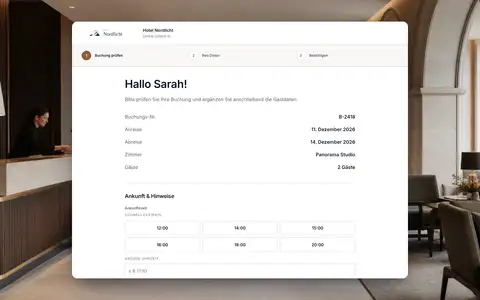
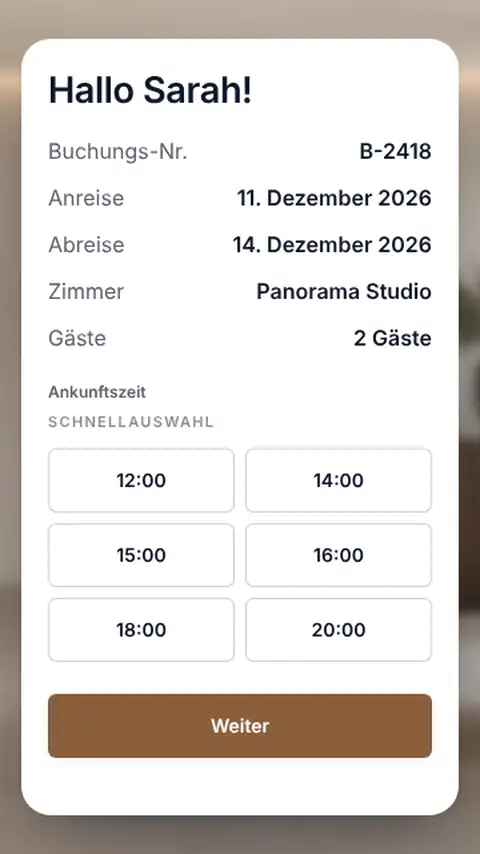
One photo of the passport, and the fields are filled.
You photograph or upload the travel document. STRYK reads the machine-readable zone and only takes over document number, date of birth and expiry date if every check digit matches. STRYK flags unreadable images and expired documents before you carry on, and asks for the document from the main guest subject to registration, unless your property asks for more.
- Passport, ID card or driving licence
- Check digits of the machine-readable zone
- Warning for unreadable images or expiry
- Registration form ready to print

At checkout, you decide how the stay is billed.
The closing screen shows the stay, open charges such as restaurant or minibar, amounts already paid and what is left. Then you choose: invoice now, invoice later as a draft, bill via an open folio, or split it when the company pays the room and the guest pays the extras. If anything is missing for a correct invoice, STRYK names the obstacle and takes you to the fix.
- Open charges and balance at a glance
- Invoice now, as a draft or via a folio
- Split between company and guest
- Take payment at the card terminal or by Tap to Pay in the STRYK App (AT, DE, NL)
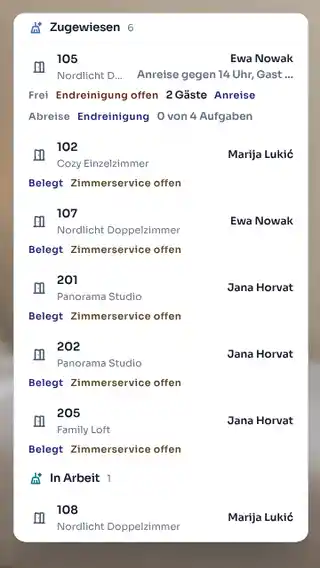
Checked out means housekeeping already knows.
Checkout sets the room to cleaning required and puts it on the housekeeping plan, even if it was already cleaned once that day. You can reverse an accidental checkout for 30 minutes, and undo a check-in just as carefully. STRYK records every step with its time in the booking history.
- Cleaning required after checkout
- New cleaning job after a second departure that day
- Checkout reversible for 30 minutes
- Undo a check-in with a full log

From the night audit to the wake-up call.
Alongside check-in and check-out, STRYK takes over the tasks that a front desk performs every day in city, business and holiday hotels. We built them around the booking, the room and the guest profile, so early, late and night shifts see the same status.
Night audit with date change
The night audit moves the hotel date, charges the room rates of the night to the stays and automatically processes bookings that did not arrive as no-shows.
Day use and hourly rooms
Day guests are booked without an overnight stay, and rooms can also be booked for a few hours. Afterwards the room is available for sale again.
Stays in several segments
If a guest changes room or rate after three nights, it remains one stay with several segments and one invoice.
Room sharing
Several guests share a room. Each stays on the booking with their own guest profile and their registration details.
Room waiting list
If a category is fully booked, the front desk puts the guest on the waiting list. When a suitable room becomes free, you see who is waiting.
Upgrades based on inventory
You offer an upgrade only in categories that are free for the entire stay. STRYK checks the inventory before you confirm.
Wake-up calls
You set up wake-up calls on the stay. The night shift sees which wake-up call is due next.
Lost property
Lost items are recorded with room, date and stay. If the guest asks, the front desk knows right away.
Parking management
You assign parking spaces for the period of the stay. The front desk sees which spaces are occupied today and which are free.
Blocked guests
If a guest profile is blocked, STRYK prevents new bookings for this guest.
Room keys and mobile keys
STRYK connects common door lock systems. The front desk creates the key from the booking, and guests receive a mobile key on request.
Cash shifts
Each person at the front desk opens and closes their own cash shift. The shift report shows what was collected during the shift.
An arrival in four steps.
We take you from the guest at the desk to the status in house.
- 01
Open the arrival
Select the guest's booking in the Today view.
- 02
Check the details
Complete registration details and ID for every guest.
- 03
Add extras
Add breakfast or a parking space on the spot.
- 04
Check in
After the summary, the stay shows as in house.
Who works with it.
Front desk
Works through arrivals and departures from one list and reuses known guest details.
Night shift
Checks in late guests with details prepared online and settles early departures.
Accounts
Receives an invoice, draft or folio with a clear billing route instead of rework.
Part of your complete system.
The front desk works with the same data as guests, registration, housekeeping and finance. That is why we did not build it as a separate program.
Common questions: Front desk & check-in
What does STRYK bring together at front desk?
Arrivals, guests, rooms, registration data, documents, extras, payments and departures remain connected to the same stay. Front desk therefore works with one current process instead of several lists.
How does the team see today’s workload?
Booking state, arrival, departure, in-house stay, payment state and room context can be filtered and searched. This turns the booking list into clear daily control.
How does check-in work in STRYK?
Front desk reviews guests, required registration data, documents, optional extras and the summary in sequence. Only the confirmed final step sets the stay to in-house.
Can every accompanying guest be recorded?
Yes. STRYK creates individual guest steps from the expected guest count. Master data and required document details can therefore be reviewed per person.
Which guest details are required at check-in?
First and last name form the basis. The property can additionally require salutation, title, email, phone, date of birth, nationality, address and custom fields.
Does STRYK recognise existing guests?
Front desk can select an existing CRM guest. Duplicate detection helps avoid accidentally creating a second master record for the same person.
Show more questions
How does STRYK handle IDs and travel documents?
Document type, number, issuing country, issue and expiry date plus a file can be recorded per guest. Property settings determine for which nationalities a document is required at front desk.
Can the property add custom check-in fields?
Yes. Custom text, selection or confirmation fields add exactly the information the operation needs. Required fields apply consistently across PMS, online check-in and kiosk.
Can front desk sell extras during check-in?
Yes. Active extras can be selected directly during check-in. STRYK calculates quantity and price per booking, night, guest, or guest and night and adds the amount transparently to the stay.
Can a deposit be recorded at check-in?
Yes. A deposit actually collected can be recorded during check-in; the paid amount increases only up to the booking total.
Can front desk see whether the room is ready?
Rooms and housekeeping use the same operational state. Front desk sees the context on the stay and can distinguish ready from an occupied room whose stayover service is complete.
When is check-in available?
STRYK takes confirmed arrivals into check-in from the arrival date. Late arrivals remain workable after usual reception hours; incorrect stay dates are not hidden by an artificial early check-in.
What does STRYK store when check-in is completed?
The stay receives in-house status and an actual check-in timestamp. Registered guests, user and process are connected traceably in the activity log.
What happens to the room after check-in?
The specific room becomes occupied and receives the housekeeping context “stayover service required”. Calendar, room centre and housekeeping then use the same state.
Can a guest change room during the stay?
Yes. STRYK checks the new room for availability and sufficient capacity over the remaining stay. Reason, old room and new room remain traceable on the booking.
What does STRYK review before check-out?
Stay, room, amount already paid and-where permitted-open POS or restaurant charges are shown together. Front desk therefore sees the real balance before completion.
Are open POS charges transferred?
Open POS charges assigned to the booking flow into the check-out total and invoice completion. Outlet, description, state and amount remain reviewable.
Is an invoice created automatically at check-out?
Yes. STRYK creates and finalises the invoice from the booking. Without a successfully created invoice, check-out is not treated as cleanly completed.
Which payment methods can be recorded at check-out?
Depending on the property workflow, cash, credit card, bank transfer, OTA paid, company account or invoice only are available. An actual payment is recorded only for the open invoice amount.
What happens to the room after check-out?
The stay closes with an actual check-out timestamp. The room changes to departure room-cleaning open and immediately enters the housekeeping workflow.
How does STRYK handle a no-show?
A confirmed arrival can be marked no-show only after the configured check-in time has elapsed. STRYK applies the stored cancellation logic, shows fee and refund and flags cases requiring manual review.
Who may perform check-in and check-out?
Only employees with the right role. If permission is missing or a step cannot be saved, the stay remains unchanged and front desk immediately sees what needs attention.
Who may perform check-in and check-out?
Only employees with the right role. If permission is missing or a step cannot be saved, the stay remains unchanged and front desk immediately sees what needs attention.
Do your next check-in with STRYK.
Try STRYK for 14 days with your own registration fields, or we will show you check-in and checkout in a demo.
