

Whoever is on shift today gets their rooms. Automatically.
A housekeeping team works in shifts, often in several languages and with colleagues who joined only last week. We built STRYK to distribute the day’s rooms based on the published rota, show the head housekeeper each person’s workload and bring requests, faults and questions to where the team already works: the phone.
Assigned by rota
Only people on the published rota get rooms.
Workload at a glance
The head housekeeper sees who has how much to do and rebalances.
Requests with an address
Room service requests go to the responsible role, not to everyone.
One language per person
Plan, app and rota PDF in each colleague’s language.
By 7 am it’s clear who takes which floor.
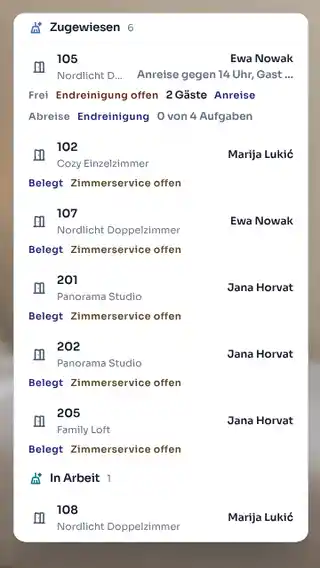
Once the housekeeping rota is published, STRYK distributes the day’s rooms among the colleagues on shift. The capacity overview shows departures, stayovers and final cleans per person; the head housekeeper moves rooms around when someone starts later. Linen changes and stayover service follow the intervals you set per category.
- Automatic assignment from published shifts
- Manual assignment at any time
- Capacity overview per person
- Blocked rooms left out
Tick the checklist, count the minibar, on to 305.
In the STRYK App each colleague opens their rooms in the right order, ticks off the checklist and records minibar consumption, which goes straight onto the guest’s invoice. STRYK records every status change in the history, from taken over to inspected. The head housekeeper inspects and releases, and reception sees it at the same moment.
- Checklists per cleaning type
- Status history per room
- “Do not disturb” stays clearly marked
- Minibar posted to the stay
Cot in 204, dripping tap in 112. Both reach the right team.
Room service requests are addressed to a role, and your team takes them over as a task in STRYK Team, with a room link, an owner and a review step. When someone reports a fault, maintenance blocks the room with a reason such as repair or servicing, and STRYK checks whether a booking is affected. Automations create tasks before arrival, such as “allergy bedding in 301”.
- Tasks linked to room and booking
- Room block with reason and conflict check
- Recurring inspections as task templates
- Board, list and calendar views
Rota, time clock and chat. No private WhatsApp group.
Team chat includes automatic role chats, for housekeeping for example, with photos, mentions and replies. Every colleague sees their rota, clocks start and breaks in the app and requests leave without paper in the office. If they like, they get the weekly plan as a PDF in their language, and change emails only when they’re affected.
- Role chats created automatically
- Time clock with breaks and corrections
- Shift swaps with approval
- “Plan week” for a fair spread

What stands out in the room reaches technical staff.
Housekeeping sees every room every day. In STRYK your team reports a defect as a ticket to technical staff and records lost property right at the room.
A morning in housekeeping.
From the published rota to release for reception.
- 01
Rota published
The department head publishes the week, and the team gets its plan.
- 02
Rooms assigned
In the morning STRYK assigns the rooms to the colleagues on shift.
- 03
Cleaned and reported
The team ticks off tasks in the app and updates the status.
- 04
Inspected and released
The head housekeeper inspects, and reception sees the room as ready.
Who works with it.
Head housekeeper
Assigns rooms, balances workload, inspects and releases.
Room attendants
Work through their own rooms in the app, in their own language.
Maintenance
Gets faults as tasks and blocks rooms with a reason until they’re ready again.
Housekeeping in the complete system.
Occupancy, rota, tasks and invoicing use the same data as the floor. That is why we built them in one system.
Common questions: STRYK for housekeeping teams
Do our room attendants need their own login?
Not necessarily. They can work from the printed or emailed PDF plan while the head housekeeper updates the status. Anyone who should work in the system directly gets their own login with suitable permissions. Since STRYK does not count users, an extra login costs nothing, billing is per room.
How does the front desk find out that a room is ready?
As soon as the head housekeeper has inspected and released a cleaned room, the status changes to “ready”. The front desk sees this in the calendar and the arrivals list and can check the guest in without phoning the floor. Whether you use the intermediate “inspected” step is up to you.
Which languages is the cleaning plan available in?
The PDF plan is available in 18 languages: German, English, Hungarian, Italian, French, Croatian, Czech, Polish, Romanian, Slovak, Dutch, Swedish, Danish, Spanish, Portuguese, Slovenian, Bulgarian and Ukrainian. Every team member can receive their plan in the language they understand best.
What happens to the plan when a guest changes rooms?
The plan follows the booking. If the front desk moves a guest from 112 to 118, 112 becomes a departure and 118 a stayover or arrival. Extensions, early arrivals and late departures also appear in the plan as soon as they are booked. You can issue a new PDF at any time.
Can we record the minibar through housekeeping?
Yes. Minibar consumption is recorded at the room and posted directly to the guest’s stay. At check-out it is already on the invoice. The front desk no longer has to ask, and you avoid drinks only being noticed after departure.
What does the housekeeping module cost?
There is no setup fee, and you can test for 14 days at no cost.
Give your head housekeeper a plan that assigns itself.
Try STRYK for 14 days with your rooms and your team, or we will show you in a demo how it runs from rota to release.
