

Arrival info, payment reminder, review request: all on autopilot.
With STRYK Automations you decide what should happen when a booking is made, a guest checks in, a payment arrives or a few days before arrival. STRYK sends the right message, adds a tag, creates a housekeeping task, notifies your team or hands the event to another system by webhook. We built automations so that you test every rule first and can read every run in the log.

Real triggers
Booking, cancellation, no-show, check-in, check-out, payment and time offsets.
Precise conditions
Narrow down by source, category, length of stay, guest type or tag.
More than email
Message, tag, note, housekeeping task, team alert or webhook.
Test first
Test run before go-live, then a log of successes, errors and skips.
The rule starts when something really happens in the stay.
An automation reacts to a booking being created, confirmed, changed or cancelled, to a no-show, check-in, completed online check-in, check-out, a payment received or a payment due. Time-based rules run minutes, hours or days before arrival, after departure or during long stays. If the guest moves their arrival, STRYK recalculates the timing.
- Booking and stay events
- Payment received and payment due
- Days before arrival or after departure
- Long stay as its own trigger
Only the guests the rule is meant for.
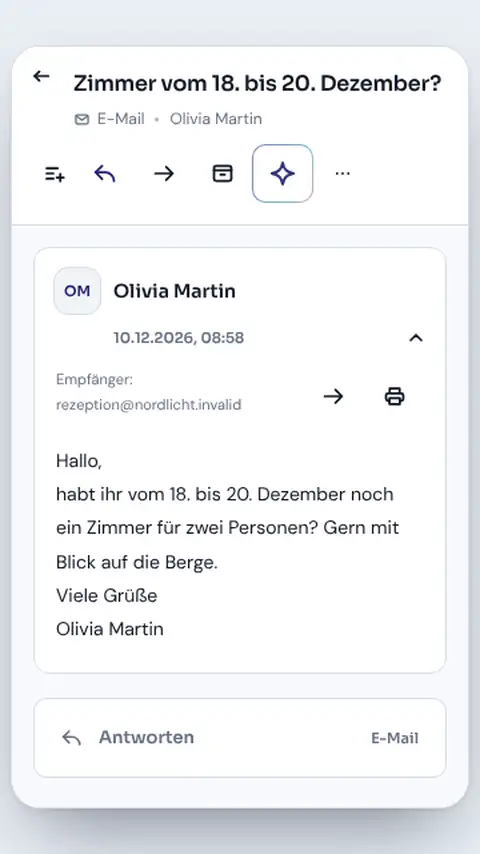
Conditions narrow things down by source, room category, length of stay, booking value, lead time, number of guests, country, weekday or tag. First-time guests and regulars can be addressed separately. Once per booking, a validity period, priority and a daily limit prevent duplicate messages.
- Source, category and length of stay
- First-time guests, regulars and VIPs
- Once per booking
- Daily limit and validity period
Not just emails: tasks, tags and alerts for the team.
Besides guest messages, a rule can create housekeeping tasks with a priority, add or remove tags, write internal notes and notify your team. By webhook it passes events to another system, with header secrets kept masked. For a long stay, for instance, the task for an extra clean is created automatically.
- Guest message from a template
- Housekeeping task with priority
- Add or remove a tag, internal note
- Team notification and webhook
Ready to go with rules from the library.
We have put ready-made rules for typical hotel routines into the template library for you, from the welcome message before arrival to the review request after departure with your review link. STRYK recognises promotional messages automatically, respects guest opt-outs and sends no marketing through booking platform messaging.
- Rules for typical hotel routines
- Review request with review link
- Marketing protection with opt-out and block list
- Placeholders from the booking
You see what ran and what did not.
Before you activate a rule, a test run checks trigger, conditions and action. Afterwards the overview shows for each rule how often it ran today and how many runs succeeded, failed or were skipped. Every entry names the booking, the guest and the reason.
- Test run before go-live
- Succeeded, failed, skipped
- Reason for every entry
- Pause a rule with one switch
From idea to a running rule.
We show you how it works with arrival information three days before check-in.
- 01
Pick a trigger
Three days before arrival, confirmed bookings only.
- 02
Narrow it down
For example only direct bookings of two nights or more.
- 03
Set the action
Template with directions, parking and the online check-in link.
- 04
Test and start
Check the test run, activate the rule, keep an eye on the log.
Who works with it.
Management
Builds and tests rules and decides which messages go out automatically.
Front desk
Gets internal alerts, about unpaid balances for example, instead of working through lists.
Housekeeping
Finds tasks created by rules directly in their own plan.
Part of your complete system.
Automations work with the same bookings, templates and tasks as your team. We did not build a second data store for them.
Common questions: Hotel automations
What does STRYK automate in daily hotel operations?
STRYK reacts to real events around booking, stay, payment and invoice. These produce targeted messages or internal work steps rather than rigid bulk emails without booking context.
Which booking events can start an automation?
Examples include new or confirmed booking, modification, cancellation and no-show. Each rule also decides which sources, room categories and guests it may apply to.
Can STRYK act automatically before arrival?
Yes. Pre-arrival rules run at a defined interval before arrival and can trigger personal information or an online check-in reminder, for example.
Which events are available during and after the stay?
Check-in, completed online check-in, long stay, checkout, post-departure and review request can each trigger their own workflows. Communication therefore matches the actual travel state.
Can a payment start an automation?
Yes. Payment received and payment due are separate triggers. The rule remains attached to the correct booking and finance context and cannot be confused with an arbitrary guest.
Which work can STRYK handle automatically?
STRYK sends relevant guest messages, alerts the team, marks stays, creates housekeeping tasks and adds internal notes. Approved partner systems can also be included in the workflow.
Show more questions
How does an automated message remain personal?
It uses a central template and only placeholders that can actually be resolved in the current booking context. Subject, content, guest details and delivery path are reviewed before activation.
How does STRYK select the right message channel?
In automatic mode, channel follows booking context: direct and manual stays use email, while connected OTA stays use their permitted booking channel. The team does not have to guess the channel for every guest.
Can the property delay automations?
Yes. Minutes, hours or days before or after a suitable event can be defined. Timing is calculated from the real stay date.
How does STRYK prevent inappropriate bulk actions?
Conditions limit the rule by length of stay, booking value, lead time, guest count, country, weekday, source, room category, tag, visit history and other attributes.
Can STRYK distinguish first-time and returning guests?
Yes. Rules can apply only to first-time visitors, returning guests, VIPs or guests above a defined visit or lifetime-value history.
How are tags used in automations?
A rule can require an existing tag, deliberately skip another tag or add or remove a tag after success. This helps prevent duplicate or conflicting workflows.
Can an automation create a housekeeping task?
Yes. Title, description and priority are created in booking context. The task complements operations but does not replace the occupancy-based housekeeping daily plan.
Can STRYK include approved partner systems?
Yes. An authorised administrator decides which information is passed to which destination. Failed handovers remain visible and can be retried deliberately.
How does STRYK prevent duplicate messages or tasks?
A rule can be limited to one execution per booking. A validity period, priority and daily limit provide additional protection against unintended repetition.
How does the property test an automation before activation?
A test run checks trigger, conditions and action with safe test context. The result is logged as a test, and the rule is activated only after operational review.
Which results appear in the execution log?
Success, failed, skipped and test remain traceable with time, booking, guest, trigger, action and detail. A failure is not disguised as an apparently successful send.
How does the team distinguish active and paused rules?
Overview and editor show enabled state, last run and today’s executions. A disabled rule or one outside its validity window triggers no action.
Who may manage automations?
Only employees with dedicated automation-management permission. Read-only or housekeeping roles cannot activate rules that contact guests or trigger external systems.
Which automation should a small property start with?
Start with a clear booking confirmation, one pre-arrival message and an internal review for outstanding payment. Three well-tested rules create more value than a confusing forest of automations.
What happens after a later booking change?
STRYK reviews the updated stay and recalculates timed steps from the new travel dates. Completed or deliberately excluded actions are not repeated without control.
What do hotel automations cost?
Core automations, templates, test runs and logs are in the base price. After a free trial month, STRYK Guest AI optionally expands communication; external delivery or integration partners may charge their own fees.
What can you try with automations in your demo access?
In your demo access you build a rule from trigger through conditions and template to a test run. You then see exactly when it ran and what result it produced.
Build your first rule in five steps.
Try STRYK for 14 days with your own property, or we will show you triggers, test runs and the log in a demo.
