

Your last free room gets sold exactly once.
Between the click on Book and the confirmation, STRYK checks everything once more: free capacity, price, policies and payment. Only then does STRYK create the stay, once and complete. We built this final check so you get a real booking: no commission, no back and forth by email and no duplicate stay after a double click.

Checked before confirming
Bookings, blocks and capacity are rechecked right before confirmation.
Price recalculated
Rate, extras, discounts and levies set the final price just before booking.
Double-click protection
Reloading or sending twice never creates a second stay.
No OTA commission
Bookings through your own website carry no commission.
Once a room is taken, the page stops offering it.
The booking page reads occupancy, room blocks and capacity limits from the same calendar your reception uses. If someone books the same night through a portal, STRYK checks again just before confirming. If the last double room has gone in the meantime, nobody receives a second confirmation.
- Free capacity from the PMS calendar
- Room blocks and maintenance taken into account
- Fresh check right before confirmation
- Updated inventory for portals via the channel manager
Total price including tourist tax, worked out for this exact stay.
STRYK recalculates the total right before confirmation from the rate, extras, discounts and levies. STRYK shows tourist tax in the price and classifies children travelling along by age. What the guest confirms is exactly what appears on the booking and the invoice.
- Tourist tax shown in the price
- Discounts and vouchers checked on the server
- Same calculation for booking and invoice
- Clear breakdown for the guest
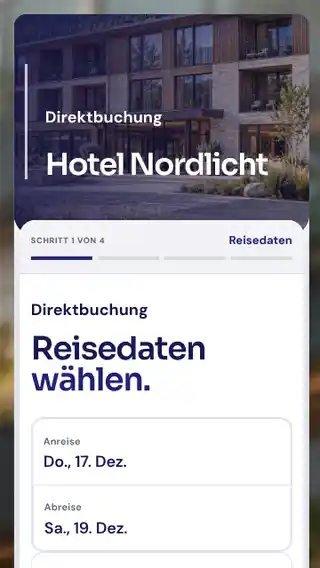
One click, one stay. Even on a shaky connection.
STRYK gives every completed booking a unique protection key. If the guest taps Book twice on the train or reloads the page, there is still only one stay. STRYK stores their acceptance of the booking and cancellation policies on the booking.
- Unique protection key per booking
- Required acceptance of the policies
- Marked as paid only after provider confirmation
- Result page with booking documents
The guest relationship starts with your property.
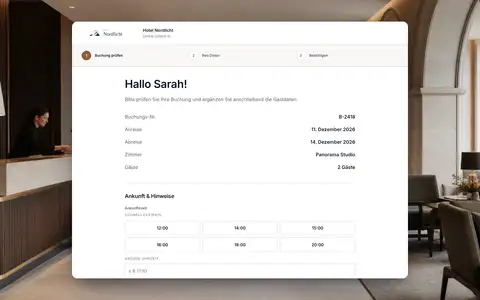
After booking, the guest writes to you directly, not through a portal's inbox. STRYK sends confirmation and arrival details in your hotel design, and an automation sends arrival information three days before check-in. Next time they stay, reception recognises the returning guest from their profile.
- Confirmation email in your hotel design
- Guest portal with messages to the hotel
- Automations before and after the stay
- Guest profile with stay history
What happens between Book and confirmed.
We built in four checks before STRYK promises a room to a guest.
- 01
Check capacity
Occupancy, room blocks and sales rules for the selected nights.
- 02
Fix the price
Rate, extras, discounts and tourist tax make up the final amount.
- 03
Policies and payment
The guest accepts the policies and pays a deposit online or chooses to pay at the hotel.
- 04
Create the stay
Guest, room, rate, extras and source land in the PMS as one record.
Who works with it.
Owner
Links the booking page wherever guests find the property and keeps the commission in-house.
Reception
Works with finished bookings instead of enquiries that still need confirming.
Accounts
Finds deposit, balance and platform fee on the same stay.
Part of your complete system.
Because we built STRYK as one system, a direct booking draws on calendar, rates, levies and guest data without handing anything between systems.
Common questions: Direct booking
What is a direct booking with STRYK?
A reservation on the property’s own STRYK booking page that enters the PMS with confirmed price, guest, rate, extras and policies.
Do I need a second system?
No. Room categories, photos, rates, availability, extras and policies come from the central STRYK areas.
Which web address does my property receive?
The property chooses an available slug, creating its own address under staystryk.com. Normal changes are deliberately limited so links and senders remain stable.
Can I preview before publishing?
Yes. Internal draft preview shows design, content, rooms, prices and guest journey without opening an unpublished public domain or creating a booking.
When may the booking page go live?
As soon as the property address, rooms, direct rate, pricing, availability, policies and payment path have been fully reviewed.
Which rooms are sold?
Only published categories with active physical rooms, complete occupancy, real photos and approved guest copy.
Show more questions
Where does availability come from?
From actual STRYK inventory. Bookings, blocks and inactive rooms reduce sellable capacity; the studio does not invent a second number.
Which rate is offered?
At least one active rate plan approved for direct sales must match category, validity, occupancy and payment method.
How is the final total calculated?
STRYK recalculates it immediately before confirmation using the rate, travel dates, guest count, pricing rules, discount, extras and tourist tax.
How does STRYK prevent overbooking?
Immediately before saving, free capacity, sales caps and restrictions are checked again. Only a still-valid stay is confirmed.
What happens on double-click or reload?
The booking request is recognised within the property by a unique key. The same checkout therefore does not silently create a second reservation.
Can guests book extras?
Yes. Guests see only approved extras with a clear unit and price. Their selection is assigned directly to the stay and included in the total.
Must guests accept policies?
Yes. Policies applying to the rate and booking are shown before checkout and acceptance is stored with the process.
Which payment methods are possible?
Only methods activated by the property and approved for the public journey appear, such as pay at property or a fully configured online payment flow.
Does a successful test already mean live payments?
No. The property activates online payments only after a complete review and its own approval. Guests see only the payment path that has actually been enabled.
How does the booking enter the PMS?
After confirmation, the booking is ready in STRYK with guest, stay, room category, rate, price, extras and payment state.
Does the guest receive confirmation?
The confirmed booking journey uses email copy maintained per event and active guest language. A delivery failure may not appear as delivered.
Is direct booking mobile optimised?
Yes. Search, room choice, extras, policies and checkout are designed for small screens and tested as a complete mobile journey before launch.
Can I take the page offline again?
Yes. Unpublish removes the public live state without deleting publication history or central master data.
Can I link booking from my website?
Yes. Once your booking page is approved, link the direct-booking journey from your website. Guests go straight to your currently available rooms and rates.
Which languages does the guest see?
The booking page is available in the 18 STRYK languages; the hotel enables which ones its guests see. Room descriptions, terms and emails should be fully maintained in every enabled language.
Does direct booking replace OTAs?
Not necessarily. It adds your own sales channel without portal commission alongside Booking.com, Expedia, Airbnb and other connected portals. Availability, rates and reservations from all channels run on the same room inventory.
Does direct booking cost extra?
Booking Engine and the direct-booking journey are included in the STRYK core price.
Make your website the most direct way into your property.
Try STRYK for 14 days and book your last free room twice in a row, or we will show you the flow in a demo.
