

Every room tells you what is happening to it today.
The room overview groups every room by category: occupied or vacant, who is cleaning it and what state it is in. Management adds new rooms with the room generator, takes them out of service or archives them, and we make sure no booking or record is lost along the way. For apartments, you store the guest access details per unit.
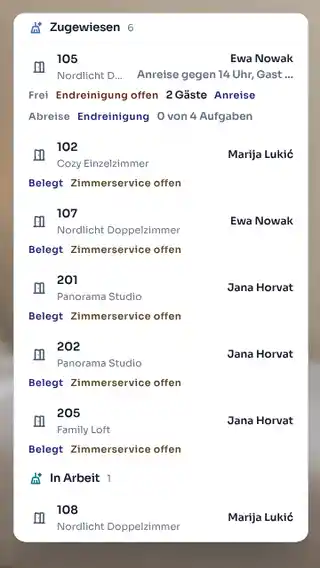
Today, on the room
Occupancy, assignment and room state sit in the same row.
Room generator
Floor, starting number and count create the new rooms in one step.
Checked lifecycle
Active, inactive or archived, with a check for open bookings.
Access per unit
Key box code and Wi-Fi encrypted, every reveal logged.
At 9am you see which rooms need work today.
The overview groups rooms by category and shows each room's floor, today's occupancy, the housekeeper in charge and states such as ready for arrival or cleaning required. Search and the category filter take you straight to the room you need. You print the room list with the columns the early shift needs, or have it delivered every day.
- Expandable category groups
- Occupancy, assignment and state per room
- Room list as a PDF with your choice of columns
- Daily delivery at the hour you choose

A new wing, set up in one step.
From floor, starting number and count, the room generator creates the room numbers, and STRYK checks them against your existing rooms. A single room takes a short dialogue, with public copy and photos taken from the category. Your own room tags such as lake view or step-free help you find rooms in the calendar.
- Room generator from floor, start number and count
- Number check before creation
- Room tags for search and filters
- Edit rooms in the STRYK App too
Archive a room without losing its history.
A room is active, inactive or archived. Before archiving, STRYK checks for open bookings and cleaning in progress and shows how your room count changes. Bookings and records are kept; a restored room stays inactive until you activate it.
- Active, inactive, archived
- Check for open bookings and cleaning
- Room count before and after
- Portable beds as a property-wide stock
Arriving at the apartment works without a reception desk.
For each category or individual unit, you store directions, house rules, Wi-Fi and the key box code. STRYK keeps the code and Wi-Fi password encrypted, they never appear in a list, and STRYK logs every reveal. In the guest portal, guests only see the details a set number of hours before arrival, and if you like, only after online check-in.
- Directions and house rules per unit
- Encrypted key box code
- Released a set number of hours before arrival
- Optionally only after online check-in
Who works with it.
Management
Adds rooms, maintains tags and decides which units count towards the stock.
Front desk
Sees on the room whether it is occupied, being cleaned or ready for arrival.
Hosts
Stores access details and house rules per apartment for contactless arrival.
Part of your complete system.
Our principle: a room exists once and works across sales, calendar and cleaning.
Common questions: Room management
What is the STRYK room centre?
It brings sellable categories, individual rooms, current occupancy, next arrival or departure, blocks and housekeeping state together in one operational view.
How are rooms organised in the overview?
Every physical room sits directly under its category. Categories can be expanded or collapsed so a small property sees everything immediately while a larger one opens only the relevant inventory.
What is the difference between a category and a room?
The category is the sellable product with capacity, copy, photos and pricing foundation. The room is the specific unit with number, floor, occupancy, block and operational state.
Which master data does an individual room have?
Room number, floor and unambiguous category assignment form the operational foundation. Tags add characteristics the team needs for search, preparation or internal organisation.
How is a new room created?
The team starts directly in the correct category, enters number and floor and saves the real unit. The category is already unambiguously selected, reducing accidental assignment.
Can STRYK create several rooms together?
Yes. When building a category, prepared number and floor batches can be created together. This speeds up initial setup without continuing later with artificial demo rooms.
Show more questions
Can a room be edited later?
Authorised employees change number, floor and category assignment in the room dialog. Before a structural change, the property should review existing and future bookings so the operational unit remains unambiguous.
What does a room card show about occupancy?
It distinguishes free and occupied and shows the relevant booking-movement context. The team can see whether a room is currently occupied or which change comes next.
Are arrival, departure and stayover visible?
Yes. The selected day controls the visible stay context. Arrival, departure and staying guest are therefore clear directly on the specific room row rather than in a separate side list.
Which housekeeping state does the room show?
The room centre uses the same current state as the calendar and housekeeping plan. Dirty, in cleaning, ready or stayover service completed are not managed as parallel copies.
What is the difference between ready and stayover service completed?
Ready means an empty cleaned room for the next check-in. Stayover service completed belongs to a room that remains occupied and whose daily service is finished.
What does “Housekeeping today” show?
The summary counts rooms to clean, ready rooms and blocked rooms and leads into the digital daily plan. Management can see in the room overview whether open work threatens the next check-in.
Can a room be assigned to a housekeeper?
In the housekeeping plan, a room is assigned to an active employee. The room centre shows that assignment; staff and active people are maintained exclusively in central settings.
How is a room taken out of sale?
The availability action creates a real room block with period, reason and optional note. Calendar, room selection, matrix and Booking Engine then use the same state.
Do maintenance and renovation belong to housekeeping state?
No. Anything that blocks availability is managed as a room or period block. Housekeeping describes cleaning and release, while defects, maintenance and renovation must also stop sale.
What are room tags used for?
Tags mark internal characteristics such as quiet location, pet room or specific equipment. They can be created centrally, edited and assigned to the right rooms without reinventing the sellable category.
Can the team jump directly to the calendar?
Yes. The calendar action opens the occupancy plan focused on the relevant room number. This avoids searching again when a movement or future booking needs review.
What does the room-list PDF contain?
The property chooses the period and columns such as room, category, floor, status, prepared occupancy, capacity, booking, guest, stay, payment, source and notes. Preview and download show the same selection.
Can a room list be created automatically?
Yes. The property defines time, time zone, period, columns and recipients. STRYK creates the list daily from this configuration and can deliver it to the stored recipients.
Who may change rooms and categories?
Reading rooms and editing room master data are separate permissions. Availability, housekeeping and staff assignment also follow their own grants so read access does not permit sales or state changes.
What happens if saving or assignment fails?
STRYK shows the error clearly. Room status or housekeeping assignment changes only after a successful save, so the team always works with the confirmed state.
Are room photos maintained on the individual room?
No. Sales photos belong centrally to the room category because guests book the category product. The individual room holds operational details, avoiding contradictory image sets by room number.
Does room management cost extra?
No. Rooms, categories, tags, blocks, housekeeping context and room lists are part of the single STRYK offer, with no setup fee and no hidden room module price. External delivery services may charge their own fees.
Set up your property with the room generator.
Try STRYK for 14 days with your real rooms, or we will show you the room overview in a demo.
